
Containers and loot
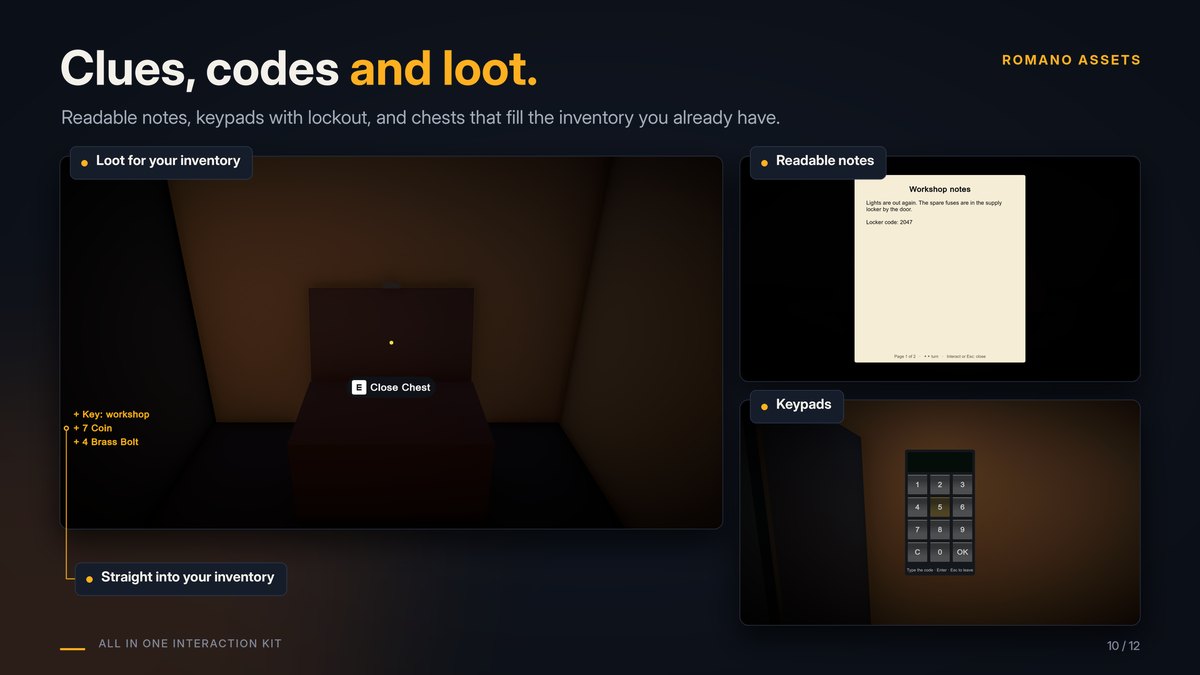
Chests, lockers, crates and drawers that hand out items, for any inventory system.
Make a container #
- Furniture or a chest with a lid or door: Setup Wizard, tick Gives loot. The first part (the lid, the door) gets a Loot Container: opening it hands out the items.
- A crate to search: Setup Wizard, Type Container. "Search Crate"; once empty it says "Empty".
- By hand: add Loot Container next to any Interactable (with or without a Hinge or Slide). Add a Lock for a locked chest.
What's inside #
- Fixed Items: items that are always in this container.
- Table: a Loot Table (Assets > Create > All In One Interaction Kit > Loot Table) with entries:
- Always: always in the container, with a count between Min and Max;
- otherwise one of the Random Picks, chosen by Weight (2 = twice as likely as 1).
- Seed: picks the random items. The same seed always gives the same loot, so every player sees the same thing. Each container gets its own seed; change it for a different result.
Items are Loot Item assets (Assets > Create > All In One Interaction Kit > Loot Item): an Id for your inventory, a Display Name, an Icon, and an optional Key Id that makes it a key.
Getting items into your inventory #
The kit has no inventory of its own. When a player opens a container, each item goes to the first component on the player that implements ILootReceiver and accepts it:
public sealed class MyInventoryAdapter : MonoBehaviour, ILootReceiver
{
    public bool TryReceive(LootItem item, int count, LootContainer from) => myInventory.TryAdd(item.Id, count);
}
Return false when it doesn't fit: the item stays in the container for later. Keys (items with a Key Id) go to the player's Key Ring first, so a key found in a chest opens the matching Lock.
No inventory yet? The container's On Item Given event (and the C# ItemGiven event) reports every item, so you can
hook up a sound, a message or your own code.
Saving and multiplayer #
Which items were taken is part of the container's saved state (see Extending). In multiplayer, add Network Interactable and Network Loot Delivery: the host decides who gets what, each item can be taken once, and items reach the player who opened the container on their own machine.