
Gameplay: Costs, Tools, Undo, Structure and Saving
Everything here goes through build requests checked by the world's authority (the LocalBuildAuthority in single
player). The preview only reads; the authority alone charges, refunds and changes the world. A multiplayer host runs
the same authority for every player.
Costs and sandbox #
- Create Resource Types (Project window: Create > All In One Runtime Building Kit > Resource Type), e.g. Wood and Stone.
- Give each piece a Cost in its Inspector (Cost and Upgrade).
- Tell the Build World where resources come from: its Resource Provider is any component that implements
IResourceProvider. Simple Resource Inventory is a ready-made one (amounts per player, everyone starts with its Starting Amounts). For your own inventory, implement the three methods:
public sealed class MyInventory : MonoBehaviour, IResourceProvider
{
    public int GetAmount(uint playerId, ResourceType resource) { /* how many the player has */ }
    public bool TrySpend(uint playerId, IReadOnlyList<ResourceAmount> amounts) { /* all or nothing */ }
    public void Give(uint playerId, IReadOnlyList<ResourceAmount> amounts) { /* refunds */ }
}
The preview says what is missing: Needs 4 Wood (you have 2). Sandbox on the Build World (B in the sample) makes
building free and removing refund nothing. Refund % sets how much of a piece's cost comes back when it is removed
(rounded down per resource). playerId is 0 in single player and the client ID in multiplayer.
Tools #
The Builder has six tools (Builder.SetTool). Confirm does what the tool says:
| Tool | Confirm | Shows |
|---|---|---|
| Place | places the selected piece | the preview, green or red with the reason |
| Remove | removes the aimed piece, with the refund | the aimed piece highlighted; "Holds up Floor_01" when it can't go |
| Move | picks the aimed piece up; the next Confirm puts it down where the preview shows (R turns it); Cancel drops it back | the piece where it would go |
| Upgrade | swaps the aimed piece for its Upgrades To tier in place | the next tier over the piece |
| Paint | gives the aimed piece the chosen look (see Looks) | the piece in the look's colour |
| Copy | copies the aimed building as a blueprint and starts stamping it | the aimed piece highlighted |
- Upgrade keeps the piece's ID and socket links (so a wall stays on its edge), charges the next tier's cost and gives back the old tier's Refund %.
- Moving is free. It relinks sockets at the new spot; a wall can go back on its own edge, facing the other way.
Builder.RotatePlaced(piece, steps)/RotateAimed(steps)turns a piece where it stands (T in the sample), for pieces that stand on things and can be placed freely or on the grid.- Events:
applied(every change this player asked for),toolChanged, plusplacedandrejected.
Undo and redo #
Builder.Undo() and Builder.Redo() (Z and Y in the sample) undo the player's own actions: placing, removing,
moving and upgrading, up to the Build World's Undo Depth (32). Undo gives back exactly what the action cost and takes
back exactly what it refunded, so it never makes or loses resources. Each player has their own history, kept by the
authority. Undo is refused, with a reason, when:
- the piece has changed since (someone else moved, upgraded or removed it): "Can't undo: Wall_03 has changed since";
- taking a piece away would leave other pieces unsupported: "Holds up Floor_01";
- something now stands where a piece would come back: "Overlaps Crate_02";
- the player can't pay back a refund: "Needs 2 Wood (you have 0)".
Structure #
A piece is held up when it stands on the ground or level geometry, or is joined by a socket to a piece that is held up, or rests on one (a crate on a foundation, a picture on a wall). The Build World's Structural Mode decides what happens when removing a piece would leave others unsupported:
- Refuse Removal (default): refused with "Holds up Wall_01 and 3 more".
- Remove Unsupported: those pieces are removed too, each with its refund.
- Off: no check.
Moving a piece that holds others up is refused in both checked modes. There is no physics collapse: pieces never fall, they are simply removed or protected.
Build zones #
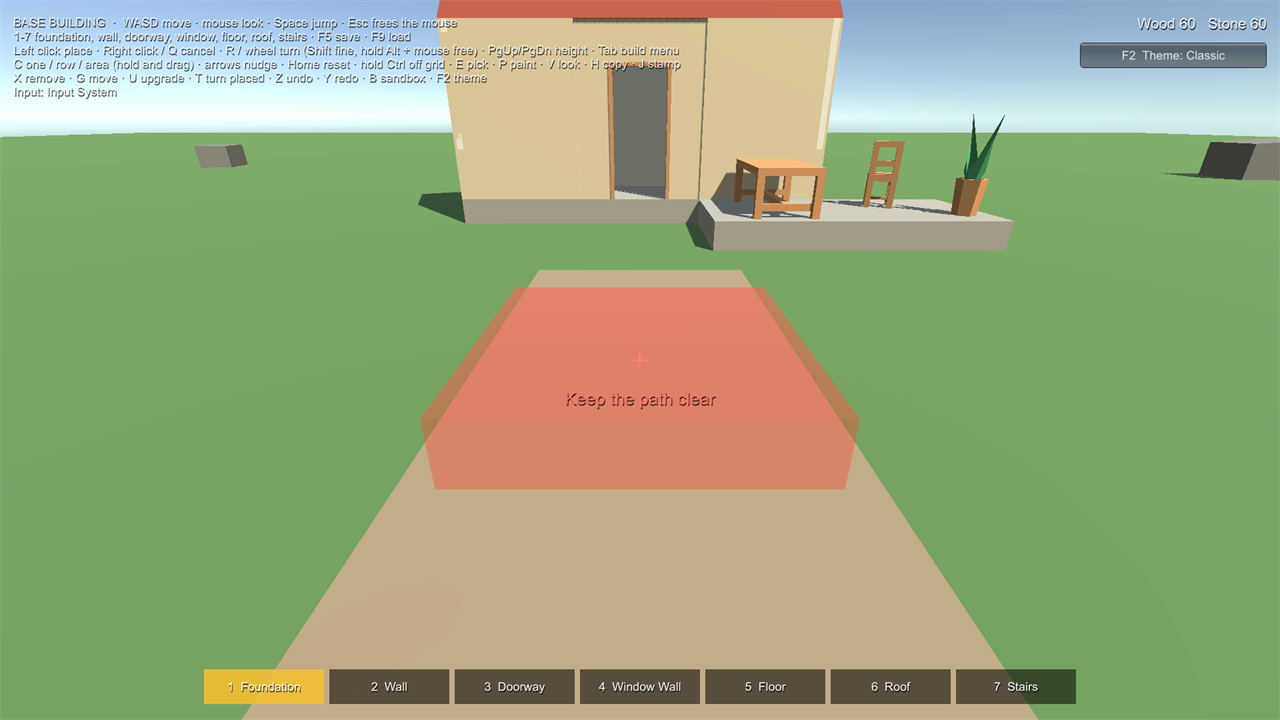
Add Component > All In One Runtime Building Kit > Build Zone on any object marks an area (a box or a sphere; move, turn and scale the object to fit it). The Scene view shows it red or green.
- Forbid: no building inside: spawn points, roads, quest areas. A piece touching the zone is refused.
- Only Allow: building only inside: a plot, a base area. The whole piece must be inside one of them.
- Reason: what players see ("Keep the path clear"). Empty: "Building isn't allowed here" / "Build inside the build area".
- Pieces and Categories: apply the zone to these only (for example: no furniture outside, foundations anywhere). Empty: every piece.
The preview shows the zone's reason before the player clicks, and the authority refuses requests that break it. Zones
belong to the Build World in their scene (or the one you set). In code: world.Zones, and
world.ActiveZones for what the rules use. The Base Building sample keeps its path clear with one.
Saving and loading #
world.Save("slot1");                          // JSON file in Application.persistentDataPath/RuntimeBuildingKit
BuildLoadReport report = world.Load("slot1");
Debug.Log(report.Summary);                    // "Loaded 41 pieces. Skipped 3 whose pieces are missing ..."
- Saves store each piece by its piece ID (never names or paths), with its pose, socket links and support, in a
versioned format (
BuildSaveData.Format). A save from a newer version of the kit is refused and the world is left as it was. - Pieces whose definition the world no longer knows are skipped; the report and one Console warning name them.
- Loading replaces everything placed and clears undo history. Only the authority (the host) should load.
- To save somewhere else (cloud, database, your own save system), implement
ISaveBackend(Write, TryRead, Exists, Delete) and pass it:world.Save("slot1", myBackend).world.CaptureSave()/world.LoadSave(data)work with the data directly. - Resource amounts belong to your inventory and are saved by it (Simple Resource Inventory doesn't save).